 Block
BlockHow to Choose the Right Grid Density for Your Subject
Learn how to choose the optimal grid density for drawing any subject. Discover recommended grid sizes, cell ratios, and practical tips to avoid visual clutter.
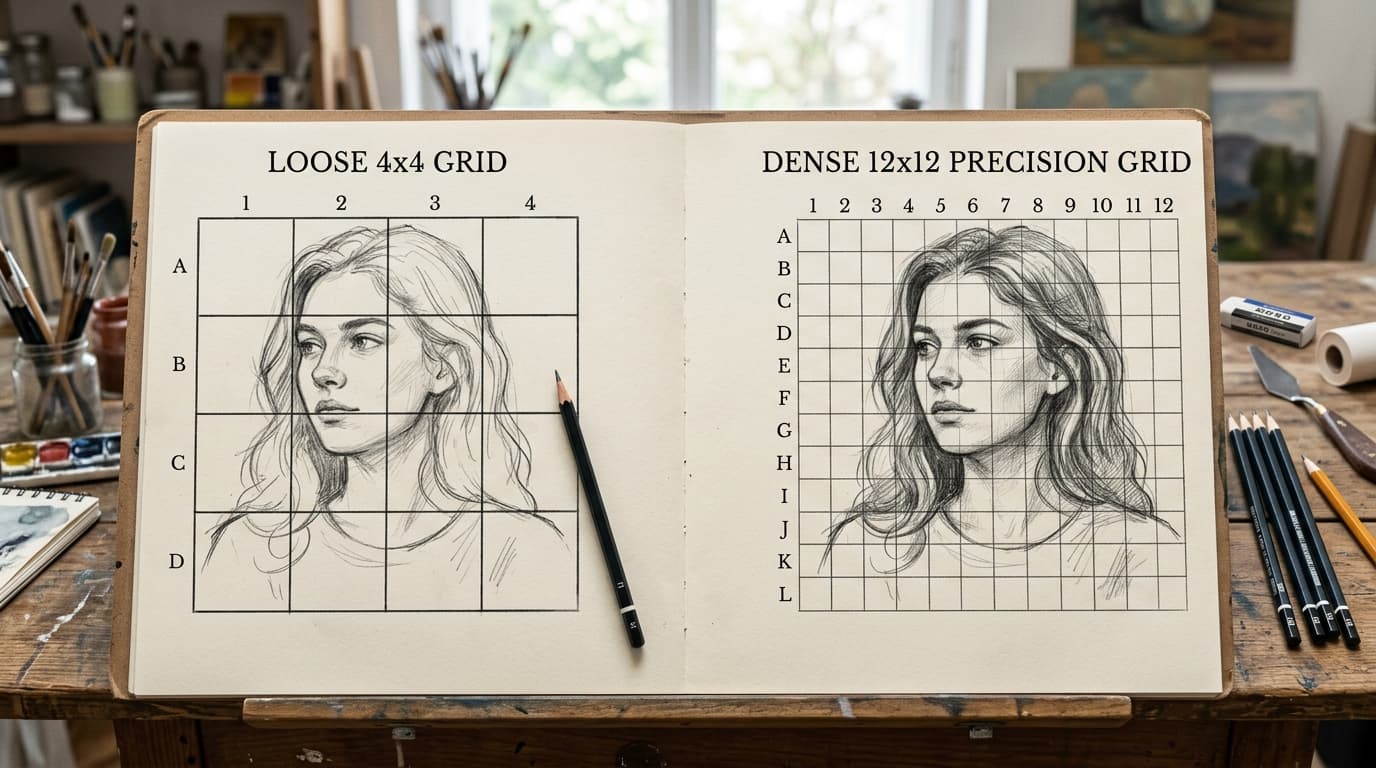
When learning how to draw or paint from a reference photo, the grid method is one of the most reliable ways to achieve accurate proportions. However, the first question almost every artist faces before sketching is deceptively simple: How many squares should I divide my picture into?
Choose a grid that is too loose—such as 3×3 or 4×4 on a close-up portrait—and each square remains too large, forcing you to guess the precise curvature of eyes, lips, and nostrils freehand. On the other hand, choose a grid that is overly dense—like 16×16 or 20×20 on a simple landscape—and you create hundreds of tiny boxes. You risk spending an hour drawing and measuring lines, cluttering your paper with graphite, and losing the expressive rhythm of your subject.
Finding the optimal grid density is about striking the ideal balance between anatomical precision and sketching freedom. In this guide, we break down the three factors that dictate grid density, provide an expanded reference matrix for common art subjects, and introduce a hybrid method for complex drawings.
The 3 Key Factors That Determine Grid Density
There is no single "magic number" that works for every picture. Instead, your choice of grid density depends on three practical variables:
1. Edge Frequency & Curvature Complexity
The density of your grid should mirror the concentration of critical contour lines. A mountain silhouette against an evening sky has low edge frequency; it consists of sweeping, gradual slopes that can easily be captured with 4 to 6 divisions. In contrast, an elderly portrait with deep expression lines, eye folds, and jewelry has high edge frequency. High-frequency subjects require smaller grid cells so that complex contours cross cell borders at easily identifiable coordinates.
2. Final Canvas Size vs. Reference Size
Grid density should always be evaluated in physical cell dimensions on your final drawing paper, not merely by the digital count of rows and columns.
An 8×8 grid on a compact 5×7 inch sketchbook produces comfortably small 0.75-inch squares. But that exact same 8×8 grid on a large 24×36 inch canvas creates massive 4.5-inch squares—far too wide for fine graphite detailing. Always calculate the resulting physical cell size on your target paper:
Physical Cell Width = Paper Width / Number of Columns
As a rule of thumb, aim for physical drawing cells between 0.75 inches and 1.5 inches (2 to 4 cm) for detailed work, and 1.5 inches to 3 inches (4 to 7.5 cm) for broad gestural work.
3. Your Individual Experience Level
Beginners often benefit from slightly tighter grids (such as 10×10) because smaller cells remove the intimidation factor, allowing you to treat each box as an isolated abstract puzzle. As your hand-eye coordination and observational skills mature, you can intentionally loosen your grid to 6×6 or 4×4, relying on the grid purely to anchor key proportional landmarks (such as the browline, chin base, and shoulder tilt).
Expanded Subject Grid Density Reference Matrix
Different genres of art present distinct spatial challenges. Use this quick reference matrix to select the ideal starting grid density for your project:
| Subject Category | Recommended Grid | Typical Cell Size (9×12 in Paper) | Primary Visual Anchor Points | Recommended Grid Style |
|---|---|---|---|---|
| Simple Still Life (Fruit, bottles, cups) | 4×4 to 6×6 | ~1.5 to 2.25 inches | Outer silhouette, table horizon line | Semi-transparent light gray |
| Broad Landscapes & Skies (Mountains, lakes, clouds) | 6×6 to 8×8 | ~1.1 to 1.5 inches | Horizon line, mountain peaks, tree clusters | High-contrast white or yellow |
| Botanicals & Florals (Petals, leaves, stems) | 8×8 to 10×10 | ~0.9 to 1.1 inches | Stem angles, petal overlap intersections | Subtle light gray |
| Figure Studies & Full Body (Gestures, dancers, poses) | 8×8 to 10×10 | ~0.9 to 1.1 inches | Head height, pelvic tilt, limb joints | Black or dark gray |
| Close-Up Portraits (Eyes, nose, lips, facial planes) | 10×10 to 12×12 | ~0.75 to 0.9 inches | Eye corners, pupil centers, nostril base, mouth corners | High-contrast with coordinate labels (A1, B2) |
| Complex Architecture & Vehicles (Perspective lines, wheels) | 12×12 to 16×16 | ~0.55 to 0.75 inches | Vanishing points, window rows, wheel arches | Thin precision lines with coordinates |
| Hyperrealism & Micro-Texture (Reflections, wrinkles, fur) | 16×16+ | Under 0.55 inches | Pore details, individual highlights | Fine cyan or magenta lines |
Testing Your Grid Density with Grid Image Maker
Before committing pencil to expensive drawing paper, you can test and fine-tune your grid density dynamically:
- Open the Tool: Go to the free Grid Image Maker.
- Upload Your Reference: Drag in your photo to load it locally in full native resolution.
- Adjust the Cell Slider: Drag the grid slider from 4 up to 16. Watch how the cells align with key features. Stop when the most critical focal points (like the eyes or key horizon points) sit comfortably inside single cells rather than straddling awkward intersections.
- Lock Short-Side Adaptation: Keep your cells strictly square so that proportions scale 1:1 without rectangular distortion.
- Preview in Grayscale: Toggle black-and-white mode to verify that your chosen grid density matches the shadow shapes and tonal masses.
Summary Checklist
- Match density to contour frequency: Low-detail landscapes thrive on 6×6; detailed portraits and architectural drafts require 10×10 to 12×12.
- Calculate physical cell dimensions: Aim for final paper squares between 0.75 and 1.5 inches for optimal control.
- Prioritize key focal features: Adjust grid density until critical elements like eyes, facial planes, or horizon lines sit comfortably within single cells.
- Always number your grid: Enable coordinate labels to avoid misplaced features when translating your reference to paper.
Test different grid densities and find the perfect square size for your drawing.